Monday, 3 June 2024

XPath examples to write in selenium

https://selectorshub.com/xpath-practice-page/

https://www.scientecheasy.com/2019/08/xpath-axes.html/


Syntax  :

//tag[@attribute='value']


1. contains() with hyperlink 

<a href="https://jasper-bi-suite.blogspot.com/2024/06/xpath-examples-to-write-in-selenium.html">XPath examples to write in selenium </a>

//div//h3//a[contains(text(),'XPath examples')]


2. id attribute

<input id="shub34" class="selectors-input jsSelector" title="Email" spellcheck="false" autocomplete="anyrandomstring" name="email" value="" placeholder="Enter email" type="email" dataid="sh_email1" onfocus="if (this.hasAttribute('readonly')) {

    this.removeAttribute('readonly');

    // fix for mobile safari to show virtual keyboard

    this.blur();    this.focus();  }">

//input[@id='shub34']


3. value attribue 

<button value="Submit">Submit</button>

//button[@value='Submit']


4. contains() method with hyperlink 

<a href="https://selectorshub.com/shadow-dom-in-iframe/" traget="_blank">Click to practice shadow dom inside iframe scenario</a>

//a[contains(text(),'Click to practice')]


5. starts-with() method 

<span>A tool to generate manual test cases automatically TestCase Studio - <a href="https://selectorshub.com/" target="_blank">DownLoad Link</a></span>

//span[starts-with(text(),'A tool to generate')]


6. id attribue

<input id="datepicker" value="pick a date" autocomplete="off" data-default-val="pick a date" class="hasDatepicker">

//input[@id='datepicker']


7. and operator 

<input id="pass" class="selectors-input jsSelector" title="Password" spellcheck="false" autocomplete="off_anyrandomstring" name="Password" type="password" value="" placeholder="Enter Password">

//input[@id='pass' and @type='password']


8. name attribue 

<input name="company" type="text" class="form-control" placeholder="Enter your company">

//input[@name='company' and @type='text']


9. name attribue

<input name="mobile number" type="number" class="form-control" placeholder="Enter your mobile number">

//input[@name='mobile number' and @type='number']


10. child and parent 


//table[@id='resultTable']//thead//tr//child::th[2]

//input[@id='ohrmList_chkSelectAll']//parent::th


<table id="resultTable" class="table hover">

<thead>

<tr>

<th class="checkbox-col" rowspan="1"><input id="ohrmList_chkSelectAll" name="chkSelectAll" type="checkbox" value=""></th>

<th class="header" style="width: 33%;" rowspan="1"><a class="null" href="https://bit.ly/shub_training_udemy" target="_blank" rel="noopener">Username</a></th>

<th class="header" style="width: 20%;" rowspan="1"><a class="null" href="https://bit.ly/shub_training_udemy" target="_blank" rel="noopener">User Role</a></th>

<th class="header" style="width: 33%;" rowspan="1"><a class="null" href="https://bit.ly/shub_training_udemy" target="_blank" rel="noopener">Employee Name</a></th>

<th class="header" style="width: 14%;" rowspan="1"><a class="null" href="https://bit.ly/shub_training_udemy" target="_blank" rel="noopener">Status</a></th>

</tr>

</thead>

<tbody>

<tr class="usr_acn">

<td><input id="ohrmList_chkSelectRecord_25" name="chkSelectRow[]" type="checkbox" value="25"></td>

<td class="left"><a href="https://bit.ly/shub_training_udemy" target="_blank" rel="noopener">Garry.White</a></td>

<td class="left">ESS</td>

<td class="left">Garry White</td>

<td class="left">Enabled</td>

</tr>

<tr class="usr_acn">

<td><input id="ohrmList_chkSelectRecord_16" name="chkSelectRow[]" type="checkbox" value="16"></td>

<td class="left"><a href="https://bit.ly/shub_training_udemy" target="_blank" rel="noopener">Jasmine.Morgan</a></td>

<td class="left">ESS</td>

<td class="left">Jasmine Morgan</td>

<td class="left">Enabled</td>

</tr>

<tr class="plan rit">

<td><input id="ohrmList_chkSelectRecord_21" name="chkSelectRow[]" type="checkbox" value="21"></td>

<td class="left"><a href="https://bit.ly/shub_training_udemy" target="_blank" rel="noopener">Joe.Root</a></td>

<td class="left">ESS</td>

<td class="left">Joe Root</td>

<td class="left">Enabled</td>

</tr>

<tr class="usr_acn">

<td><input id="ohrmList_chkSelectRecord_2" name="chkSelectRow[]" type="checkbox" value="2"></td>

<td class="left"><a href="https://www.youtube.com/c/SelectorsHub?sub_confirmation=1" target="_blank" rel="noopener">John.Smith</a></td>

<td class="left">Admin</td>

<td class="left">John Smith</td>

<td class="left">Enabled</td>

</tr>

<tr class="plan rit">

<td><input id="ohrmList_chkSelectRecord_14" name="chkSelectRow[]" type="checkbox" value="14"></td>

<td class="left"><a href="https://www.youtube.com/c/SelectorsHub?sub_confirmation=1" target="_blank" rel="noopener">Jordan.Mathews</a></td>

<td class="left">ESS</td>

<td class="left">Jordan Mathews</td>

<td class="left">Enabled</td>

</tr>

<tr class="plan rit">

<td><input id="ohrmList_chkSelectRecord_15" name="chkSelectRow[]" type="checkbox" value="15"></td>

<td class="left"><a href="https://bit.ly/shub_training_udemy" target="_blank" rel="noopener">Kevin.Mathews</a></td>

<td class="left">ESS</td>

<td class="left">Kevin Mathews</td>

<td class="left">Enabled</td>

</tr>

</tbody>

</table>

Wednesday, 29 May 2024

Azure DevOps CI(Continuous Integration) Pipeline to build selenium with cucumber code

 YAML script:

pool:
  name: Azure Pipelines
  demands: maven
steps:
- task: Maven@3
  displayName: pom.xml
  inputs:
    mavenPomFile: UIAutomation/pom.xml
    goals: 'clean package assembly:single'
    options: '-Dmaven.test.skip=true'
    testResultsFiles: '**/surefire-reports/junitreports/TEST-*.xml'

- task: CopyFiles@2
  displayName: 'Copy Files to: $(build.artifactstagingdirectory)'
  inputs:
    SourceFolder: '$(system.defaultworkingdirectory)'
    Contents: '**/*.jar'
    TargetFolder: '$(build.artifactstagingdirectory)'
  condition: succeededOrFailed()

- task: PublishBuildArtifacts@1
  displayName: 'Publish Artifact: drop'
  inputs:
    PathtoPublish: '$(build.artifactstagingdirectory)'
  condition: succeededOrFailed()

Using classical editor Pipeline tasks are as follows
NOTE : Click on images for gallery view. 


PowerShell script to attach cucumber report and send email by running .ps1 file

Save below code as .ps1 file

# How to run .ps1 from command line ? 
# powershell.exe -ExecutionPolicy Bypass -File qa-smoke-newman.ps1
$sendMailFromE1 = @{
    From = 'AutomationTeam@email.com'
    Subject = 'RegressionTests(API) | Soap, Rest | Cucumber/RestAssured Automation Results | QA Lab'
    Body = "Hi Team, `nPlease find the attached Cucumber automation report for Soap and Rest Regression Test results in QA lab.
        `nThank you`n Automation Team"
    SmtpServer = 'smtp-xy.mycompany.com'
}
# Define arrays of email addresses for "To" recipients
$toRecipients = @(
    'all-engineering-xyzproduct@mycompany.com',
'pochampalli.itlabs@mycompany.com'
)
#Define arrays of email addresses for "CC" recipients
$ccRecipients = @(
    'member1@mycompany.com',
'member2@mycompany.com',
)
# Define the attachment paths
$attachments = @(
    'C:\APIAutomation\target\cucumber-reports\api-cucumber-report.html'
)
Send-MailMessage -To $toRecipients -Cc $ccRecipients -Attachments $attachments @sendMailFromE1


To run this .ps1 file use below java code in cucumber, selenium framework. 
How to run power shell script file in selenium cucumber AfterAll hook using JVM shutdown method How to run power shell script file in selenium cucumber AfterAll hook using JVM shutdown method 

Tuesday, 28 May 2024

How to run power shell script file in selenium cucumber AfterAll hook using JVM shutdown method


@AfterAll(order = 1) // Cucumber AfterAll hook with order 2
	public static void putFile() throws JSchException, SftpException, IOException, InterruptedException {
		Log.info("AfterAll - with order=1");

		InetAddress localhost = InetAddress.getLocalHost();
		Log.info("System IP Address : " + (localhost.getHostAddress()).trim());

		if (localhost.getHostAddress().trim().equals("11.111.44.77")) {
			Runtime.getRuntime().addShutdownHook(new Thread(new Runnable() {
				@Override
				public void run() {
					
					try {
						// Path to your PowerShell script
						String scriptPath = "C:\\APIAutomation\\qa-api-rc-cucumber-restassured.ps1";

						// Command to run PowerShell with execution policy bypass and script execution
						String[] command = { "powershell", "-ExecutionPolicy", "Bypass", "-File", scriptPath };

						// Create process builder
						ProcessBuilder pb = new ProcessBuilder(command);

						// Start the process
						Process process = pb.start();

						// Read the output
						BufferedReader reader = new BufferedReader(new InputStreamReader(process.getInputStream()));
						String line;
						while ((line = reader.readLine()) != null) {
							System.out.println(line);
						}

						// Wait for the script to finish
						int exitCode = process.waitFor();
						System.out.println("Script execution finished with exit code: " + exitCode);

					} catch (IOException | InterruptedException e) {
						e.printStackTrace();
					}
					
				}
			}));
			System.out.println("Application Terminating ...");

		} else {
			System.out.println("Since this is not the lab server skipping sending email from linux server");
		}

	}
Hi

Friday, 24 May 2024

Windows based authentication using encoded url in selenium cucumber

Use below code to login to an application that uses windows based pop-ups. 
      @Given("Windows based authentication with encoded url")  
      public void loginApp() throws Throwable {  
       String applicationURL = "https://www.example.com/  
       //Ensure password should not contain @  
       String user = URLEncoder.encode(System.getProperty("user"), StandardCharsets.UTF_8.toString());  
       String pwd = URLEncoder.encode(System.getProperty("password"), StandardCharsets.UTF_8.toString());  
       String encodeUrl = "https://" + user + ":" + pwd + "@" + applicationURL.split("https://")[1];  
       System.out.println("Encoded URL " + encodeUrl);  
       driver.get(encodeUrl);  
       driver.navigate().refresh();  
      }  

NOTE : 

1) Ensure you pass the user and password as environment variable in eclipse or from the command prompt. 

For instance: In eclipse, 
-Duser=myuser,-Dpassword=mypassword

2) We used @ in the password and it didn't work for us, so if you have @ in password login may not work.

Implementation Credits: SS

Friday, 9 February 2024

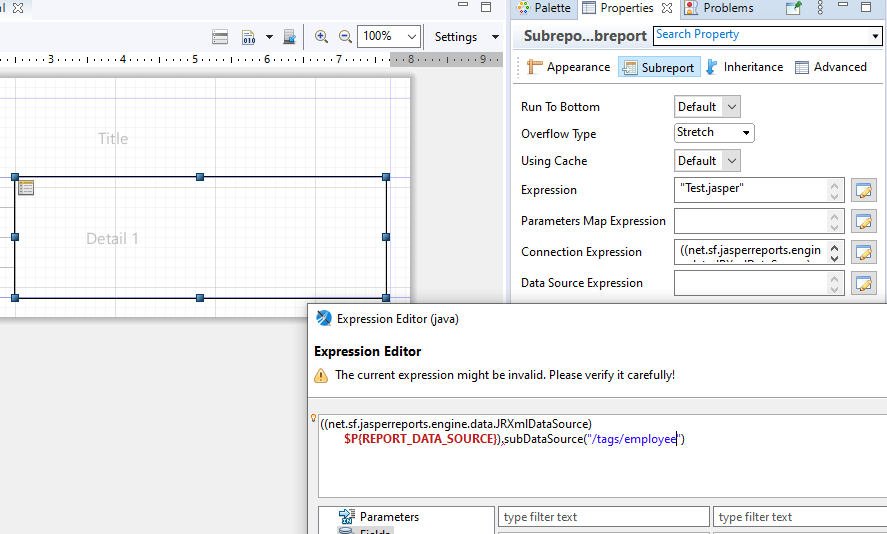
Tip: Connection Expression for Sub report for XmlDataSource in jasper reports

 In an XML data adapter report, when you call a sub report of same data adapter in master report, one can use below expression to establish connection. 

((net.sf.jasperreports.engine.data.JRXmlDataSource)

$P{REPORT_DATA_SOURCE}).subDataSource("/tags/employee")


Friday, 22 December 2023

How to stop auto downloading of log4j-1.2.12 in selenium , testng, maven project ?

When you create a new maven project in eclipse and try to update it, you would likely to an auto download of 1.2.12 log4j jar that is variable. 
One possible reason I came across on this is due to 1.5 java version dependencies added while creating a new maven project and if you update or wait for the pom to download all the dependencies the project auto downloads this and it may lead to security concerns. 

The solution that worked for me was to update the execution environment in maven project i.e., to Java 11. 


Having 1.x version of log4j is a serious security concern in modern cloud or on premise based solutions. 


Update the Execution environment from 1.5 to 1.8 or 9, 10 or 11 or to higher version


Saturday, 4 November 2023

java.lang.NoSuchMethodError: 'void org.testng.TestRunner.(org.testng.internal.IConfiguration, org.testng.ISuite, org.testng.xml.XmlTest, boolean, java.util.Collection, java.util.List)'

When you see below error add : TestNG to the build path


[RemoteTestNG] detected TestNG version 7.8.0

SLF4J: Failed to load class "org.slf4j.impl.StaticLoggerBinder".

SLF4J: Defaulting to no-operation (NOP) logger implementation

SLF4J: See http://www.slf4j.org/codes.html#StaticLoggerBinder for further details.

java.lang.NoSuchMethodError: 'void org.testng.TestRunner.<init>(org.testng.internal.IConfiguration, org.testng.ISuite, org.testng.xml.XmlTest, boolean, java.util.Collection, java.util.List)'

	at org.testng.remote.support.RemoteTestNG6_12$1.newTestRunner(RemoteTestNG6_12.java:33)

	at org.testng.remote.support.RemoteTestNG6_12$DelegatingTestRunnerFactory.newTestRunner(RemoteTestNG6_12.java:66)

	at org.testng.ITestRunnerFactory.newTestRunner(ITestRunnerFactory.java:52)

	at org.testng.SuiteRunner$ProxyTestRunnerFactory.newTestRunner(SuiteRunner.java:720)

	at org.testng.SuiteRunner.init(SuiteRunner.java:224)

	at org.testng.SuiteRunner.<init>(SuiteRunner.java:116)

	at org.testng.TestNG.createSuiteRunner(TestNG.java:1375)

	at org.testng.TestNG.createSuiteRunners(TestNG.java:1349)

	at org.testng.TestNG.runSuitesLocally(TestNG.java:1191)

	at org.testng.TestNG.runSuites(TestNG.java:1114)

	at org.testng.TestNG.run(TestNG.java:1082)

	at org.testng.remote.AbstractRemoteTestNG.run(AbstractRemoteTestNG.java:115)

	at org.testng.remote.RemoteTestNG.initAndRun(RemoteTestNG.java:251)

	at org.testng.remote.RemoteTestNG.main(RemoteTestNG.java:77)

Thursday, 21 September 2023

How to get currentDate+1day (Tomorrow's date) in m/dd/yyyy format in postman

In Postman Tests section write below code. 

const currentDate = new Date();

currentDate.setDate(currentDate.getDate() + 1);

const formattedDate = `${currentDate.getMonth() + 1}/${currentDate.getDate()}/${currentDate.getFullYear()}`;

console.log(formattedDate);


Example : 

If today's date is 9/21/2023 then we get 9/22/2023 in the console log.

Wednesday, 23 August 2023

Workaround fix to specify custom download path for ChromeDriver 114 or Browser 114, Selenium 4.11.0

Hi, The following questions and the fix is a work around to download the file to a custom folder in with chrome driver/browser with 114 version 

  1. Are you getting asked to Save the file while trying to download in Incognito mode? 
  2. Does the file download to "Downloads" folder by default in non incognito mode ?  
  3. Are you seeing in consistent behavior to download a file using ChromeDriver 114 ?   


The work around fix worked for me is to keep the browser in headless mode with --headless=old so the file will download to custom path specified. 

final static String downloadPath = "C\\Automation\\downloads;
HashMap<String, Object> chromePrefs = new HashMap<>();
chromePrefs.put("download.default_directory", downloadPath);

System.out.println(chromePrefs.get("download.default_directory"));
ChromeOptions options = new ChromeOptions();

options.setExperimentalOption("prefs", chromePrefs);
options.addArguments("--headless=old");
driver.set(new ChromeDriver(options));

 References: 

https://stackoverflow.com/questions/76175638/unable-to-change-default-download-directory-for-chrome-selenium-instance-linux

https://github.com/SeleniumHQ/selenium/issues/11637

Monday, 24 July 2023

Batch script to run MS SQL server sql commands

 Hi, use "sqlcmd" utility in batch script run a set of sql commands/queries through batch script. 

Make sure to install the following odbc driver and command line utility
msodbcsql.msi and MsSqlCmdLnUtils.msi

runsql.bat
@echo off
sqlcmd -U "sa" -P "MyPassword#123" -S 11.123.4.56 -i "C:\SQLScripts\CleanUp.sql"
timeout /t 5 /nobreak
exit


CleanUp.sql
use abcDatabase
delete from accountTable where AccountId='123'


I hope you find this useful! If you like it, pls do subscribe my YouTube channel for automation or tech updates.

Batch script to run perl file in linux machine | How to connect to linux in batch script and run perl file

To run a perl file placed in linux machine from batch file use "plink" utility of PuTTY in batch scripting. 

As shown below write batch script and as on execution of batch file in windows machine, the perl will be triggered in linux machine. 

PuTTY should be installed in the windows(source machine) and plink.exe should be there in the installation folder and it does the job of running perl file in linux machine. 

perlexecutioninlinux.bat

@echo off
set "destinationUser=linuxadmin"
set "destinationPassword=MyPassword#123"
set "destinationHost=11.123.4.567"
set "scriptPath=/home/linuxadmin/AutomationProject/my-perl-file.pl"

plink -pw %destinationPassword% -batch %destinationUser%@%destinationHost% "perl %scriptPath%"

timeout /t 5 /nobreak
exit

I hope you find this useful! If you like it, pls do subscribe my YouTube channel for automation or tech updates.

Sunday, 23 July 2023

Batch script to copy newman report from windows machine to linux machine

To copy newman html report (or in general any file) from windows machine to linux machine use below batch script. 

PuTTY should be installed in the windows(source machine) and pscp.exe should be there in the installation folder and it does the job of copying files from source to destination. 


REM linux machine details 
@echo on
set SOURCE_DIR=C:\postman\newman\
set USERNAME=linuxadmin
set PASSWORD=MyPassword#123
set LINUX_MACHINE_IP=1.123.4.567
set DESTINATION_DIR=/home/%USERNAME%/AutoDrive
set FILE_PATTERN=*SmokeTestsNewmanReport.html*

REM copy files from windows to linux
pscp -pw %PASSWORD% %SOURCE_DIR%%FILE_PATTERN%  \ %USERNAME%@%LINUX_MACHINE_IP%:%DESTINATION_DIR%
timeout /t 15 /nobreak
exit

I hope you find this useful! If you like it, pls do subscribe my YouTube channel for automation or tech updates.

Batch script to execute newman/postman collection on two different environments by opening two command prompts at a time

Hi, batch script below does the following: 

1) Delete newman html extra report if already exists in Reports folder under C drive
2) Starts two command prompts in the background and calls the node.js to run the same set of newman/postman smoke tests at a time on two different environments. 

As two start commands begins execution simultaneously , we need NOT to wait until the first one finishes so can avoid sequential execution and achieve kinda of parallel execution on two different environments with same collection.  

REM set the reports path
@echo on
set "filePath-1=C:\Reports\SmokeTestReportServer-1.html"
set "filePath-2=C:\Reports\SmokeTestReportServer-2.html"

REM Delete the reports if already exists in Reports folder
if exist "%filePath-1%" del /Q /F "%filePath-1%"
if exist "%filePath-2%" del /Q /F "%filePath-2%"

REM Executing Smoke Tests at a time by opening two command prompots for two different servers 
echo 'Server1'
start /B cmd /c call newman run "SmokeTests.postman_collection.json" -e "Server1Env.postman_environment.json" -r htmlextra --reporter-htmlextra-export "C:\Reports\SmokeTestReportServer-1.html" 
echo 'Server1 execution is done'

echo 'Server2'
start /B cmd /c call newman run "SmokeTests.postman_collection.json" -e "Server2Env.postman_environment.json" -r htmlextra --reporter-htmlextra-export "C:\Reports\SmokeTestReportServer-2.html"
echo 'Server2 execution is done' 

timeout /t 3 /nobreak
exit


start: Start a program, command or batch script, opens in a new/separate Command Prompt window.
More about start command and /B option -->  https://ss64.com/nt/start.html
/B         Start application without creating a new window. In this case
              Ctrl-C will be ignored - leaving Ctrl-Break as the only way to 
              interrupt the application.

cmd: Start a new CMD shell and (optionally) run a command/executable program.
More about cmd command and /C option: --> https://ss64.com/nt/cmd.html
   /C     Run Command and then terminate

del: Delete one or more files.
More about del command and /Q /F options  --> https://ss64.com/nt/del.html
      /F  Ignore read-only setting and delete anyway (FORCE) 
      /Q  Quiet mode, do not give a Yes/No Prompt before deleting.

I hope you find this useful! If you like it, pls do subscribe my YouTube channel for automation or tech updates.

Replace in postman java script | replace domain name with ip in url and then set as environment variable

Let us assume a POST response is returning a URL in header.  

Now, how to replace the DNS name with IP address and set the URL as environment variable ? 

Below postman java script does the job. 

The first var line(var siteurl) gets the URL from the POST response. 
The second var line(var ip) gets the IP from environment variable , 
The third var line(var location)  replaces the DNS name with IP and then 
The fourth var line sets the new URL that is replaced from third line as environment variable(location). 

var siteurl = pm.response.headers.get("location");  // location= https://www.this-is-amazon-site-hostname.com/books
console.log("siteurl="+siteurl) //	https://www.this-is-amazon-site-hostname.com/books

var ip = pm.environment.get("serverip"); //serverip is the environment variable
console.log("Server IP="+ip)  	//   10.123.4.23

var location = siteurl.replace("www.this-is-amazon-site-hostname.com", ip);
console.log("location="+location) // https://www.10.123.4.23/books

pm.environment.set("sitenewurl",location) //sitenewurl is the environment variable and the value will be set to  https://www.10.123.4.23/books


Run newman/postman collection from batch file with html extra report

Hi, using "call" command, one can run newman collection from a batch file. This doesn't require to open Node.js command explicitly. 

More about call : 

https://learn.microsoft.com/en-us/windows-server/administration/windows-commands/call

Newman installation: 
https://learning.postman.com/docs/collections/using-newman-cli/installing-running-newman/

Html Extra Report: 
https://github.com/DannyDainton/newman-reporter-htmlextra

Html Extra Report Extended: 
https://www.npmjs.com/package/newman-reporter-htmlextra-extended

newman-smoke.bat

@echo on
cd C:\PostmanCollections
timeout /t 5 /nobreak

call newman run "SmokeTests.postman_collection.json" -e "QALabEnv.postman_environment.json" -r htmlextra,cli --reporter-htmlextra-export "C:\Reports\SmokeTestReport.html" --reporter-htmlextra-title "Smoke Test Dashboard - QA Lab" --reporter-htmlextra-titleSize 6 

echo 'Execution of SmokeTestscollection successful!' 


-r htmlextra, cli 
This part in the command generates html extra report as well as report output on the console. 

--reporter-htmlextra-title "Smoke Test Dashboard - QA Lab"
This part in the command gives the custom name to the report. 

 --reporter-htmlextra-titleSize 6 
This part in the command used to specify the size of the report title (1 through 6, 1 is min 6 is max) 

To redirect the batch logs from console to file add below piece of batch script at the beginning of the file. 
@echo off
set LOGFILE=smoke-log.log
call :LOG > %LOGFILE%
exit /B
:LOG

I hope you find this useful! If you like it, pls do subscribe my YouTube channel for automation or tech updates.

Saturday, 22 July 2023

Send latest cucumber report as email notification after automation execution

 Hi, In this blog post, we will see the core concept that worked for us to send cucumber report or extent report as notification after running automation. 

Normally, sending email is done through an SMTP server. This requires username and password details to be provided in the code. To avoid security threats or credentials exposure in the codebase, use perl MIME:Lite ( that is old and not recommended rather there are many alternative utilities such as Email::MIME or MIME::Entity and Email::Sender) utility that doesn't require any credentials( at least password is not required).

In this example, in order to send extent or cucumber report as automation notification, we use linux machine where perl is running and automation is run through a windows machine. 

In windows, cucumber or extent report will be generated --> copy this report to linux  and then perl will take care of sending email with html report as an attachment. 

Copying the jar file to linux, running perl are the two major things that the seleniuum/java code should take care of. And below is how it done. 

Read this article on how basic perl script can be used to send an html file(in this case the html file is cucumber report or extent report) as an attachment.

  • Add jsch dependency to pom.xml 
  • Write email code in AfterAll hook so always latest report is copied to linux. 
  • The important part is to write email code in jvm shutdown method that is inside the AfterAll hook 
  • Create a single session and open two channels, one channel is to copy and the other is to execute perl script that sits in linux. 

jsch dependency

<dependency>
	<groupId>com.jcraft</groupId>
	<artifactId>jsch</artifactId>
	<version>0.1.54</version>
</dependency>

Hooks.java
package com.email.common;
import java.net.InetAddress;
import com.jcraft.jsch.Channel;
import com.jcraft.jsch.ChannelExec;
import com.jcraft.jsch.ChannelSftp;
import com.jcraft.jsch.JSch;
import com.jcraft.jsch.JSchException;
import com.jcraft.jsch.Session;
import com.jcraft.jsch.SftpException;
import com.jcraft.jsch.SftpProgressMonitor;

public class Hooks {

	final public static SftpProgressMonitor monitor = new SftpProgressMonitor() {
		public void init(final int op, final String source, final String target, final long max) {
			System.out.println("sftp start uploading file from:" + source + " to:" + target);
		}

		public boolean count(final long count) {
			System.out.println("sftp sending bytes: " + count);
			return true;
		}

		public void end() {
			System.out.println("sftp uploading is done.");
		}
	};

	@AfterAll(order = 2) // Cucumber AfterAll hook with order 2
	public static void putFile() throws JSchException, SftpException, IOException, InterruptedException {
		System.out.println("AfterAll - with order=2");

		InetAddress localhost = InetAddress.getLocalHost();
		System.out.println("System IP Address : " + (localhost.getHostAddress()).trim());

		if (localhost.getHostAddress().trim().equals("127.0.0.1")) {
			Runtime.getRuntime().addShutdownHook(new Thread(new Runnable() {
				@Override
				public void run() {
					String FromWindows = "C:\\Automation\\target\\cucumber-reports\\cucumber-report.html";
					String ToLinux = "/home/linuxadmin/AutomationProject/cucumber-report.html";

					JSch jsch = new JSch();
					Session session = null;
					try {
						session = jsch.getSession("linuxadmin", "12.445.1.999", 22); //linux machine
						session.setConfig("StrictHostKeyChecking", "no");
						session.setPassword("MyPassword+@!");
						session.connect();
						Channel channel = session.openChannel("sftp");
						channel.connect();
						ChannelSftp sftpChannel = (ChannelSftp) channel;
						System.out.println("Server's home directory: " + sftpChannel.getHome());
						try {
							sftpChannel.put(FromWindows, ToLinux, monitor, ChannelSftp.OVERWRITE);
						} catch (SftpException e) {
							System.out.println("File is not found in Windows: ");
							e.printStackTrace();
						}

						Channel channel2 = session.openChannel("exec");
						((ChannelExec) channel2).setPty(true);
						((ChannelExec) channel2).setCommand("perl /home/linuxadmin/AutomationProject/report-notify-email.pl");
						channel.setInputStream(null);
						((ChannelExec) channel2).setErrStream(System.err);

						InputStream in = channel2.getInputStream();
						channel2.connect();
						byte[] tmp = new byte[1024];
						while (true) {
							while (in.available() > 0) {
								int i = in.read(tmp, 0, 1024);
								if (i < 0)
									break;
								System.out.print(new String(tmp, 0, i));
							}
							if (channel2.isClosed()) {
								System.out.println("exit-status: " + channel2.getExitStatus());
								break;
							}
							try {
								Thread.sleep(1000);
							} catch (Exception ee) {
							}
						}

						sftpChannel.exit();
						channel.disconnect();
						channel2.disconnect();
						session.disconnect();

					} catch (Exception e) {
						e.printStackTrace();
					}

					System.out.println("Shutdown Hook is running !");
				}
			}));
			System.out.println("Selenium application is terminating ...");

		} else {
			System.out.println("Skipping sending email from linux server");
		}

	}

}


Below code is normally works well but the backdrop is one must provide an email account credentials (username and password). This exposes security issues so to avoid follow aforementioned technique. 

javax.mail dependency
<!-- https://mvnrepository.com/artifact/javax.mail/mail -->
<dependency>
	<groupId>javax.mail</groupId>
	<artifactId>mail</artifactId>
	<version>1.4.7</version>
</dependency>


@AfterAll(order = 1) // Cucumber AfterAll hook with order 1
	public static void afterAllEmail() {

		 final String username = "sadakar@email.com";
		 final String password = "MyPassword#12!";
		 		 
		 Properties props = new Properties(); 
		 
		 props.put("mail.smtp.auth", true);
		 props.put("mail.smtp.starttls.enable", true);
		 props.put("mail.smtp.starttls.required", true);
		 props.put("mail.smtp.host","smtp.office365.com");
		 props.put("mail.smtp.ssl.trust", "smtp.office365.com");
		 props.put("mail.smtp.port","587"); 
		 props.put("mail.debug", "true");
		 props.put("mail.smtp.ssl.protocols", "TLSv1.2");
		 
		 Session session = Session.getInstance(props, new javax.mail.Authenticator() {
		 protected PasswordAuthentication getPasswordAuthentication() { return new
		 PasswordAuthentication(username, password); } });
		 
		 try {
		 
			 Message message = new MimeMessage(session); 
			 message.setFrom(new InternetAddress("sadakar@email.com"));
			 message.setRecipients(Message.RecipientType.TO, InternetAddress.parse("toemail@email.com"));
			 message.setSubject("UI Automation Report");
			 message.setText("Please refer to the AutomationExtentOrSparkReport.html for the test results");
			 
			 MimeBodyPart messageBodyPart = new MimeBodyPart();
			 Multipart multipart = new MimeMultipart();
			 
			 messageBodyPart = new MimeBodyPart(); String automationReportPath =
			 System.getProperty("user.dir");
			 System.out.println("Spark Report File Path="+automationReportPath); 
			 String file = automationReportPath+"//target//ExtentReport//AutomationExtentOrSparkReport.html";
			 String fileName = "AutomationExtentOrSparkReport.html"; 
			 DataSource source = new FileDataSource(file); 
			 messageBodyPart.setDataHandler(new DataHandler(source)); 
			 messageBodyPart.setFileName(fileName);
			 
			 multipart.addBodyPart(messageBodyPart);
			 message.setContent(multipart);
			 
			 System.out.println("Sending");
			 Transport.send(message);
			 System.out.println("Done");
		 
		 } catch (MessagingException e) { e.printStackTrace(); }
			System.out.println("Email hook ending");
		 
	}

I hope you find this useful! If you like it, pls do subscribe my YouTube channel for automation or tech updates.